CI/CD: The Missing Link Between Writing Code and Delivering Results
Published on November 27, 2026 | Category: DevOps
Writing code is one thing. Turning that code into a reliable, working application that customers can actually use is another story.
Imagine a development team spending weeks building a fantastic application. The features are ready, the code looks good, and everyone is excited about the launch. But then comes testing, fixing bugs, integrating changes, checking compatibility, and finally deploying everything.
Suddenly, what seemed like a straightforward release turns into a long checklist of technical tasks.
Sound familiar?
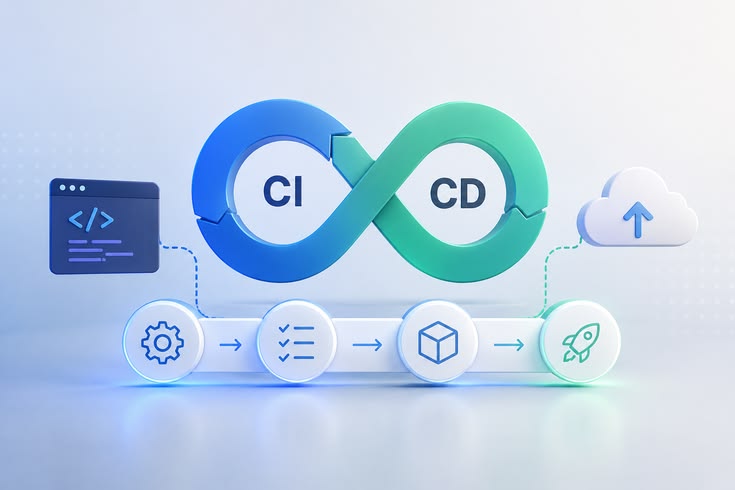
This is where CI/CD Pipeline Services make a real difference. They help development teams connect coding, testing, integration, and deployment into a more organized and automated workflow. Instead of treating every software release as a major event, businesses can move towards a continuous and reliable delivery process.
Let's explore how CI/CD bridges the gap between writing code and delivering real results.
1. The Coding Is Done. Now What?
Software development doesn't end when a developer finishes writing code. In fact, that's where another important journey begins.
Every application goes through several stages before reaching its users:
Code development and updates
Integration of changes from different developers
Automated and manual testing
Bug identification and resolution
Application deployment
Continuous monitoring and improvement
When these activities are handled manually, even a small code change can require considerable time and coordination.
Developers may spend more time managing repetitive deployment tasks than working on new features. Testing can become inconsistent, and last-minute errors may delay releases.
The problem isn't necessarily the code. Sometimes, it's the process surrounding the code.
A well-designed CI/CD pipeline helps bring these activities together, making software delivery more predictable and efficient.
2. CI/CD Explained: Two Concepts, One Powerful Workflow
CI/CD stands for Continuous Integration and Continuous Delivery (or Continuous Deployment).
Although these terms are often used together, each has a distinct role.
Continuous Integration (CI): Bringing Everyone's Code Together
In modern development environments, multiple developers often work on different parts of the same application. Continuous Integration allows them to regularly merge their code changes into a shared repository.
Whenever new code is submitted, automated processes can build the application and run tests to identify potential issues.
Think of it as checking the ingredients before preparing a complete meal. Finding a problem early is much easier than discovering it when everything is already on the table.
Continuous Delivery (CD): Keeping Software Ready for Release
Continuous Delivery takes the process further by automatically preparing tested code for deployment.
The application passes through defined testing and validation stages, making it ready for release whenever the business decides to deploy.
Continuous Deployment (CD): Releasing Without the Extra Waiting
Continuous Deployment goes one step further. Once code passes the required automated checks, it can be released directly into the production environment without requiring a separate manual approval for every change.
The choice between continuous delivery and continuous deployment depends on business requirements, risk tolerance, and release policies.
Together, these practices create a smoother path from development to production.
3. Inside a CI/CD Pipeline: What Happens Behind the Scenes?
A CI/CD pipeline works like a well-organized production line. Every stage has a specific responsibility, and the output of one stage becomes the input for the next.
Here's how a typical pipeline works:
Step 1: Code Commit
Developers write code and push their changes to a shared version control repository. This triggers the pipeline.
Step 2: Build Automation
The system automatically compiles or packages the application, checking whether the latest changes can be successfully built.
Step 3: Automated Testing
The code goes through automated tests to identify bugs, errors, and unexpected behaviour. Depending on the project, this may include unit, integration, functional, and security testing.
Step 4: Code Validation
Additional quality and security checks help ensure that the application meets the required standards before moving forward.
Step 5: Deployment
Once the application passes the necessary checks, it moves to a staging or production environment, depending on the deployment strategy.
Step 6: Monitoring and Feedback
The application is monitored after deployment. Performance issues, errors, and user feedback help teams identify areas that need improvement.
And just like that, a process that could involve several manual handovers becomes a connected workflow.
4. Why Businesses Are Moving Towards CI/CD
Faster software releases are useful, but speed alone isn't the real advantage. Businesses also need consistency, reliability, and control.
Here are some reasons why organizations are adopting CI/CD practices:
Fewer Last-Minute Surprises
Automated testing helps identify issues earlier in the development cycle. This reduces the chances of discovering major problems just before a release.
Faster Development Cycles
Repetitive tasks such as building, testing, and packaging applications can be automated, allowing developers to focus on more meaningful work.
Better Team Collaboration
CI/CD encourages developers, testers, and operations teams to work within a connected process instead of operating in separate silos.
Consistent Software Quality
Standardized testing and validation processes make it easier to maintain quality across multiple releases.
More Predictable Deployments
A structured pipeline reduces dependency on manual steps and makes releases easier to manage.
These benefits become especially valuable for businesses handling complex applications, frequent updates, and growing customer expectations.
5. CI/CD and DevOps: Better Together
CI/CD and DevOps are closely connected, but they aren't exactly the same thing.
DevOps is a broader approach that encourages collaboration between development and operations teams. CI/CD supports this approach by automating important parts of software integration, testing, and delivery.
With effective DevOps Services, businesses can improve collaboration, streamline workflows, and establish more consistent software delivery practices.
CI/CD pipelines also work alongside other technologies, including:
Container & Microservices Services: Containers help package applications and their dependencies consistently, while microservices support independently developed and deployed application components.
Infrastructure Management Services: Reliable infrastructure provides the foundation needed to run applications, manage environments, and support deployments.
Business Process Automation Services: Automation reduces repetitive activities and improves operational efficiency across business workflows.
Application Modernization Services: Modernizing legacy applications can help organizations adopt updated development practices, cloud environments, and automated deployment processes.
When these capabilities work together, businesses can create development environments that are easier to maintain, scale, and improve.
6. CI/CD Is Not Just for Large Technology Companies
There's a common misconception that CI/CD is only useful for large organizations with huge development teams.
That's not true.
A growing startup launching its first application can benefit from automated testing and deployment. An established business upgrading its software can use CI/CD to manage frequent changes. Even a small development team can save valuable time by automating repetitive tasks.
Consider different business applications:
A Website Development Company can use CI/CD to test and deploy website updates more consistently.
A Mobile App Development Company can streamline application builds, testing, and release preparation.
Teams working on Frontend Development Services can automate build processes and validate interface changes.
A full stack development company can coordinate updates across frontend, backend, and database components.
Businesses investing in Data Science Services can use automation to manage testing and deployment workflows for data applications and machine learning models.
The important thing is to design the pipeline according to the application's architecture, development process, and business goals.
7. Building a CI/CD Pipeline That Actually Works
Installing an automation tool doesn't automatically create an efficient development process. A successful pipeline needs proper planning.
Here are a few practices worth following:
Start With the Right Workflow: Understand the existing development process before deciding which activities should be automated.
Choose Suitable Tools: Select tools that work with the programming languages, repositories, infrastructure, and deployment environments used by the team.
Prioritize Automated Testing: Automation is only as useful as the quality of the checks being performed. Build meaningful tests that cover critical application functionality.
Include Security Early: Integrate security checks into the pipeline rather than treating security as a final step.
Monitor Every Release: Track deployment performance, application errors, and pipeline failures to identify opportunities for improvement.
Keep Improving: Review pipeline performance regularly and update processes as the application grows.
Businesses may also need experienced Support Engineers and skilled development professionals to maintain complex workflows. Through IT Resource Augmentation Services, organizations can access additional technical expertise when their internal teams need support.
8. Beyond Faster Releases: Preparing for the Future of Software Development
Software development is constantly evolving. Applications are becoming more connected, customer expectations are increasing, and businesses need to introduce improvements without disrupting existing operations.
This shift is closely linked to Digital Transformation Services, where organizations use modern technologies and processes to improve how they operate.
CI/CD contributes to this transformation by making software updates more manageable and development cycles more responsive.
For example, businesses investing in AR/VR Development Services may need structured workflows to manage application builds and frequent updates. Organizations working on Digital Experience improvements need are eliable ways to introduce changes to customer-facing platforms.
Even companies exploring digital marketing solutions, Creative Design Services, graphics and design Services, and ui ux designing can benefit from development workflows that support frequent website and application improvements.
Whether the goal is to enhance a website, modernize an application, or introduce a new digital product, an efficient delivery process helps turn ideas into usable solutions.
9. Your Code Deserves a Better Route to Production
Writing quality code is important, but delivering it efficiently is equally essential.
Without a structured process, development teams can get caught up in repetitive tasks, delayed releases, and avoidable deployment challenges. CI/CD helps connect the different stages of software development, making the journey from code to production smoother and more organized.
With the right strategy, automation tools, and technical expertise, businesses can build development workflows that support continuous improvement and long-term growth.
At JFS Technologies, we understand that successful software development goes beyond writing code. Explore our technology capabilities and discover how the right development and automation approach can help your business build, improve, and deliver better digital solutions.
Because great software shouldn't just be built. It should reach the people who need it, reliably and efficiently.
Latest Blogs
How Do Microservices Talk to Each Other Without Getting Lost?
Imagine ordering a pizza online. You place the order, make a...
Read MoreNovember 16, 2026
The Software That Once Worked Perfectly Might Be Holding Your Business Back
Somewhere in your business, there might be an application th...
Read MoreNovember 13, 2026
Transforming Legacy Systems Without Starting From Scratch
Imagine running a business with software that has been aroun...
Read MoreNovember 05, 2026
Related Blogs
How Do Microservices Talk to Each Other Without Getting Lost?
Imagine ordering a pizza online. You place the order, make a...
November 16, 2026
Read More
The Software That Once Worked Perfectly Might Be Holding Your Business Back
Somewhere in your business, there might be an application th...
November 13, 2026
Read More.png)
How Full Stack Development Services Help Businesses Build Scalable Applications
In today's competitive digital environment, businesses need...
October 22, 2026
Read More